Overview
Descendant Charts are User Items that create descendant box charts where generations are aligned in columns. Children appear to the right of their parents. Second Site adds as few rows as possible between siblings to minimize the height of the chart while retaining the essential tree structure of the chart. See the example in Second Site News #007.
For people in the chart who have a person page entry, the chart entry links to the person page entry and vice-versa.
Edit Descendant Chart
The Edit Descendant Chart window controls the properties of a Descendant Chart.
Shared Properties
Second Site uses many of the same properties for all the different chart types. If you do not see a property explained here, look for it on the Chart Properties page. See the Chart Membership page for an explanation of the Continue Excluded Lines property and other topics related to why people appear—or don't appear—in charts.
Chart colors are determined by the Theme but can be changed by the user via the properties in the Stylesheets.Theme.Chart section. Other stylesheet options are controlled via the chart-related styles in the Stylesheet.System section.
Optimize Space
The Optimize Space property controls how rows are used in the chart. The choices are described in the table below. The default is "Some optimization".
In the descriptions that follow, a subtree is the set of people who are descendants of a particular person in the chart.
| Value | Description |
|---|---|
| No optimization | Each descendant has their own row except for the first child of a parent, who shares a row with that parent. |
| Some optimization | Second Site squeezes some of the vertical space out of the chart by moving a subtree up if there is an open gap above the subtree that is as wide as the widest part of the subtree. |
| More optimization | Second Site squeezes some of the vertical space out of the chart by moving a subtree up if the rows above the subtree have gaps that fit the shape of the top of the subtree. |
Include Spouses
If the Include Spouses property is checked, the descendant report will include partners with whom a descendant had children.
Include Childless Spouses
If the Include Spouses property is checked, and the Include Childless Spouses property is also checked, the descendant report will include partners who share a Marriage Group event with the descendant even if the union did not produce children.
Include Marriage Date
If spouses are included and the Include Marriage Date property is checked, spouse entries will include the marriage date in the lifespan. The default value is unchecked.
The marriage date is subject to the Show when Principal to Marriage Event detail filter.
Include Person Entry Chart Link for Spouses
If spouses are included and Include Person Entry Chart Link for Spouses is checked, which is the default, spouses who appear in the chart will have links back to the chart in their person page entry.
If Include Person Entry Chart Link for Spouses is not checked, spouses who appear in the chart will not have links back to the chart in their person page entry.
Uncheck the option if you prefer that person page entries include links back to the chart only when the person is related to the subject of the chart, and not related by marriage.
Use Spouse Style
If the Use Spouse Style property is checked, spouse boxes will use the Chart Spouse Box style rather than the Chart Female Box style or the Chart Male Box style.
Box Size and Geometry
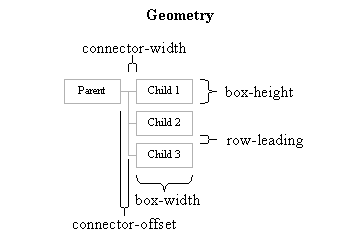
The Box Width, Box Height, Connector Offset, Connector Width, and Row Leading properties control the geometry of the chart.
Geometry When Spouses Are Not Included
Geometry When Spouses Are Included
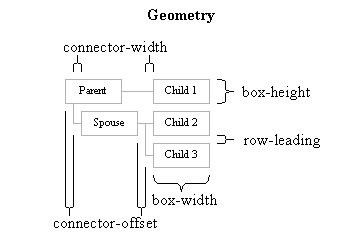
If the parent has any children where the spouse or co-parent is not identified, those children will appear above any children where the spouse or co-parent is identified.
This page last changed on 05 Feb 2016.